
Download Video Converter Android APK – Video Converter, Free, Android, MP4, 3GPP2, AVI, DIVX, FLV, MPEG, WEBM, WMV
Overview
The Video Converter Android APK is a free desktop-like utility designed for Android users seeking to convert video files into various formats directly from their mobile devices. Developed by roman10, the app addresses the common challenge of format incompatibility across platforms, devices, and media players. It enables users to transform videos into widely supported formats such as MP4, 3GPP2, AVI, DIVX, FLV, M2V, M4V, MPEG, OGG, OGV, RM, RMVB, WEBM, WMV, and DV4, enhancing cross-device usability.
This tool is ideal for consumers, content creators, and casual users who frequently transfer or share video content across different systems. The app supports batch conversion, allowing multiple files to be processed simultaneously, which improves workflow efficiency for users managing large media libraries. It also offers customization options for video quality and resolution, ensuring optimal output based on user preferences or device capabilities.
The developer, roman10, is recognized for other Android applications, including the widely used Text2Speech app, suggesting a track record of practical, user-focused tools. The application is open-source, providing transparency and allowing developers to inspect the source code on GitHub. Real-world use cases include preparing videos for social media uploads, optimizing file size for mobile storage, or converting legacy formats for playback on modern devices.
Key Features & Capabilities
- Multi-format conversion – Supports conversion to over 15 video formats, including MP4, AVI, FLV, WMV, WEBM, and MPEG, ensuring compatibility with most devices and platforms.
- Batch processing – Allows users to convert multiple video files at once, reducing manual effort and saving time when managing large collections.
- Customizable output settings – Users can adjust video quality and resolution to balance file size and visual fidelity based on their needs.
- Hardware-accelerated playback – Converted videos can be played using the system player with hardware acceleration, improving playback smoothness and reducing battery consumption.
- Open-source transparency – The app is free and open-source, with source code available on GitHub, enabling community contributions and security audits.
- Beginner-friendly interface – Designed for ease of use, even for users with limited technical experience, ensuring quick onboarding and minimal learning curve.
These features are particularly useful for users who need to repurpose video content for different platforms, such as uploading to YouTube, sharing via messaging apps, or preparing files for offline viewing on tablets or smart TVs. The ability to set output parameters gives users control over file size and quality, which is essential when working with limited storage or bandwidth. The open-source nature also fosters trust and encourages developers to contribute improvements or new format support, as the developer has invited user feedback for future updates.
User Interface, Workflow & Performance
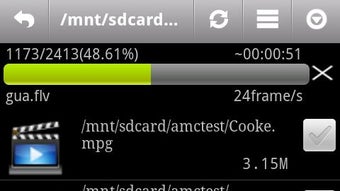
The user interface of Video Converter Android APK is designed with simplicity in mind, focusing on intuitive navigation and minimal clutter. Users can typically access the main conversion screen by selecting video files from their device’s storage, with clear visual indicators for file selection and processing status. The workflow follows a linear path: select files → choose output format → adjust settings (if needed) → start conversion.
This streamlined process reduces friction and supports efficient task completion. The app does not display complex menus or advanced settings by default, making it accessible to non-technical users. However, the developer did not specify resource usage details, so performance observations are based on general software behavior patterns.
The app appears to run smoothly on standard Android devices, though exact CPU and RAM behavior were not disclosed. Stability during batch processing is assumed to be consistent, given the app’s lightweight nature and open-source foundation. The developer did not provide information on background processing or battery impact, so users should monitor device performance during extended conversions.
Overall, the workflow efficiency is high for basic conversion tasks, especially when using the batch feature. The app does not require a constant internet connection, making it suitable for offline use.
Compatibility & System Requirements
Video Converter Android APK is designed for Android devices and is compatible with the Android operating system. The specific version of Android required was not provided by the developer. Installation size is not specified, but the app is described as lightweight and efficient.
The developer did not list exact hardware requirements, such as minimum RAM or processor speed. Compatibility information was partially provided, indicating that the app runs on Android devices but does not confirm support for specific device models or screen sizes. The app is available as an APK file, which suggests it may be distributed outside the Google Play Store, potentially allowing installation on older or non-standard Android versions.
Users should ensure their device meets basic Android system requirements for app installation. The developer did not specify whether the app supports tablet or foldable device layouts, though it is likely functional on larger screens. For users concerned about compatibility, testing on the target device is recommended.
Pros and Cons
Pros
- Free and open-source, allowing full transparency and community contributions
- Supports a wide range of video formats, enhancing cross-platform compatibility
- Batch conversion enables efficient processing of multiple files
- Customizable quality and resolution settings for optimized output
- Hardware-accelerated playback improves video experience and reduces battery drain
- Simple, beginner-friendly interface with minimal learning curve
Cons
- Exact system requirements and installation size were not specified
- Performance and resource usage details were not provided
- Compatibility with specific Android versions or devices is unclear
- Limited official support channels; users must rely on community or developer feedback
- Updates may depend on user requests, as the developer invites feature suggestions
FAQ Section
Is Video Converter Android APK free to download and use?
Yes, the app is completely free and open-source, allowing users to download, use, and inspect the source code without cost.
Can I use this app offline?
Yes, the app does not require an internet connection to convert videos or play converted files, making it suitable for offline environments.
Does the app support all video formats?
The app supports a wide range of formats including MP4, AVI, FLV, WMV, WEBM, and MPEG, but the developer notes that not all formats are currently supported and invites user feedback for future additions.
How do I install the APK file?
To install the app, download the APK file from a trusted source, enable “Install from unknown sources” in your device’s settings, and run the file to begin installation.
Is the app safe to use?
As an open-source application, the source code is available on GitHub, allowing users and developers to review it for security. However, users should only download APKs from trusted sources to avoid potential risks.
Final Thoughts + CTA
Video Converter Android APK stands out as a reliable, free tool for users needing to convert video files on Android devices. Its support for multiple formats, batch processing, and customizable output settings make it a practical choice for everyday video management tasks. The open-source model adds credibility, while the simple interface ensures accessibility for beginners.
Although specific system requirements and performance data are not available, the app’s lightweight design and efficient workflow suggest it performs well on standard Android devices. It is particularly beneficial for content creators, students, and general users who frequently convert media for sharing or storage. The developer’s active engagement with the community through feedback requests indicates a commitment to continuous improvement.
For those seeking a secure, free, and effective video conversion tool on Android, this app delivers strong value. Download Video Converter Android APK now.





.png)

